Planning a passage from your phone
Passages are planned in the cockpit as much as at the chart table: the routing page now fits a phone, a long press placing the points.
Passages are often planned at the chart table, but just as often in the cockpit or at anchor, phone in hand, the evening before leaving. A page made for a large screen and a mouse does not survive that: tiny buttons, a map squeezed into a corner, and no right click to place a point.
The routing page now fits a phone: the map on top, the panel below, which folds away to give the whole screen to the map. A long press on the map stands in for the right click, to put the departure or the destination there and, once both are placed, to swap them for the way back.
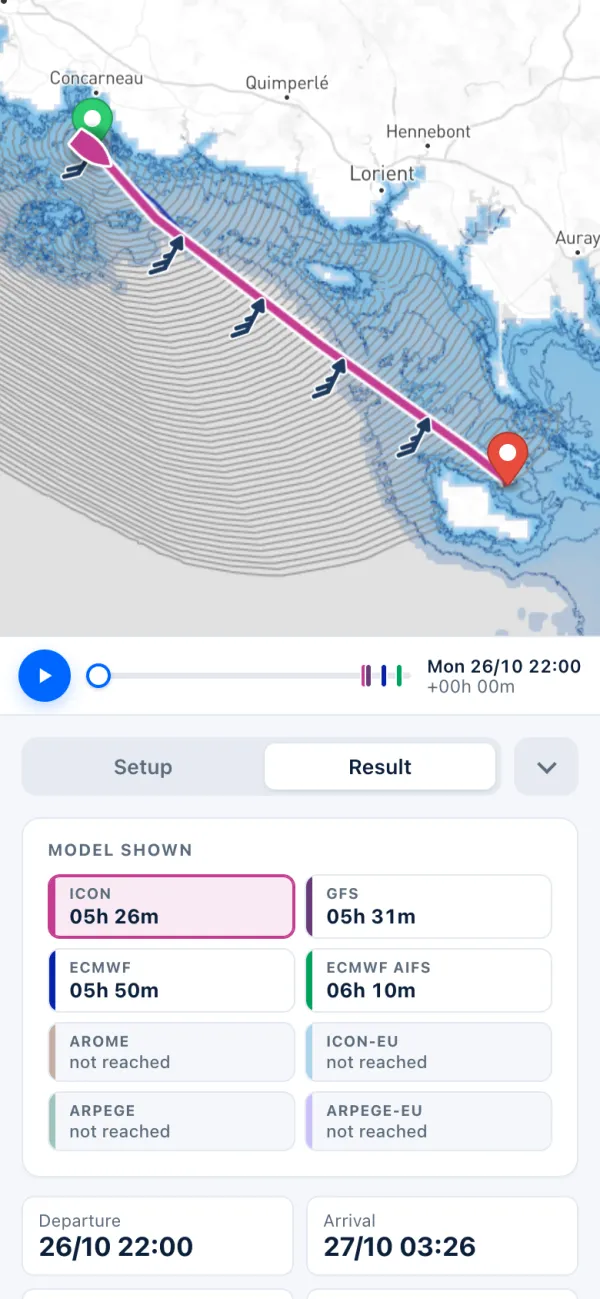
It is the whole routine, not just the map: the My boat page fits a phone too, so the polar, the performance and the engine can be set from the cockpit as well.
Picture the crew at anchor off Le Palais, the evening after the crossing from Concarneau. The new runs are in: a long press swaps the two points for the way home, the routes are computed again, and the time cursor shows whether the models still agree on a fair breeze at dawn, or whether waiting for the afternoon gets you home sooner. The decision is made before dinner, without going below to the chart table.
The routes are computed on the server, not on the phone: out of mobile coverage, there is no new route, so compute before you lose the signal and keep the page open. And a small screen shows less at once: for a long passage with many models to weigh, a larger screen still helps.